
When it comes to Salesforce, forms are the bridge between your business and your customers. From capturing leads to onboarding clients, the way you design and manage forms directly impacts how smoothly information flows into Salesforce. But here’s the catch — choosing the right Salesforce form builder can be confusing. With dozens of apps on the AppExchange, how do you decide which one actually fits your business?
That’s exactly what this guide is for. We’ll walk you through the top Salesforce form builders, compare their pricing and features side by side, and show you why Forms Fusion the QR code powered, no-code form builder built natively for Salesforce is quickly becoming the smarter choice for businesses in 2026 & beyond.
Why Do You Need a Salesforce Form Builder?
Think of Salesforce as the engine of your business and forms as the fuel that powers it. Without easy to use forms, customer data collection becomes messy, error prone, and slow. A great Salesforce form builder should:
- Let you build forms without writing a single line of code
- Integrate natively with Salesforce objects, fields, and records
- Support advanced logic — multi step flows, conditional fields, file uploads
- Work across digital and physical touchpoints (think QR codes at events, on packaging, or in store)
- Improve the customer experience while cutting down manual data entry
Customers today expect frictionless digital experiences. If your forms feel clunky, outdated, or require a phone camera but no QR support, they’ll abandon them halfway through. That’s where the right tool — and the right format — makes all the difference.
The Top Salesforce Form Builder Apps in 2026
We reviewed the most widely used Salesforce form builders and compared them across features, pricing, and ease of use.
1. Forms Fusion
Overview: A modern, Salesforce no code form builder built natively for Salesforce, with a standout feature competitors don’t offer built in QR code generation for every form, so you can bridge offline and online lead capture instantly. It enables businesses to create branded forms without coding while keeping all data securely inside Salesforce. The platform is designed for faster deployment, simplified form management and seamless customer data collection.
Pros: Native Salesforce data sync, QR-code-based form distribution, fast setup, clean drag-and-drop builder, budget-friendly pricing.
Cons: Newer to the market but shipping new features and templates every month.
2. FormAssembly
Overview: A well established Salesforce form builder with a strong focus on enterprise and regulated industries. It is widely used by organizations that require secure data collection and strict compliance standards. The platform supports complex workflows while maintaining reliability for large-scale business operations.
Pros: Advanced integrations, compliance ready (HIPAA, GDPR).
Cons: Steep learning curve, expensive for small and midsized businesses.
3. Formstack for Salesforce
Overview: A flexible builder offering automation and workflow features beyond basic forms. It helps teams streamline approvals, automate repetitive tasks and improve data collection processes. The platform works well for organizations managing multiple business workflows across departments.
Pros: Good for complex data collection; integrates with other apps in your stack.
Cons: Pricing tiers climb quickly as you scale; can be overkill for simple use cases.
4. Titan Forms
Overview: Built specifically for Salesforce users with advanced form and document generation needs. It combines form creation with document automation to support enterprise-level business processes. The platform is best suited for organizations requiring highly customized workflows and document management.
Pros: Deep Salesforce integration; powerful for enterprise document workflows.
Cons: Expensive; steep setup for startups and SMBs.
5. Gravity Forms + Salesforce Add-on
Overview: A WordPress based form solution that connects to Salesforce via an add-on. It is a practical choice for businesses that already manage their websites through WordPress. The integration allows website form submissions to flow into Salesforce without building a native Salesforce solution.
Pros: Great if you’re already running on WordPress.
Cons: Limited Salesforce first capabilities; relies on third party add-ons.
6. JotForm for Salesforce
Overview: A popular drag-and-drop form builder with a Salesforce integration. It offers a large template library and an intuitive interface for quickly building online forms. The platform is well suited for teams looking for a straightforward solution without extensive technical setup.
Pros: Easy to use; affordable for smaller teams.
Cons: Limited advanced Salesforce native features.
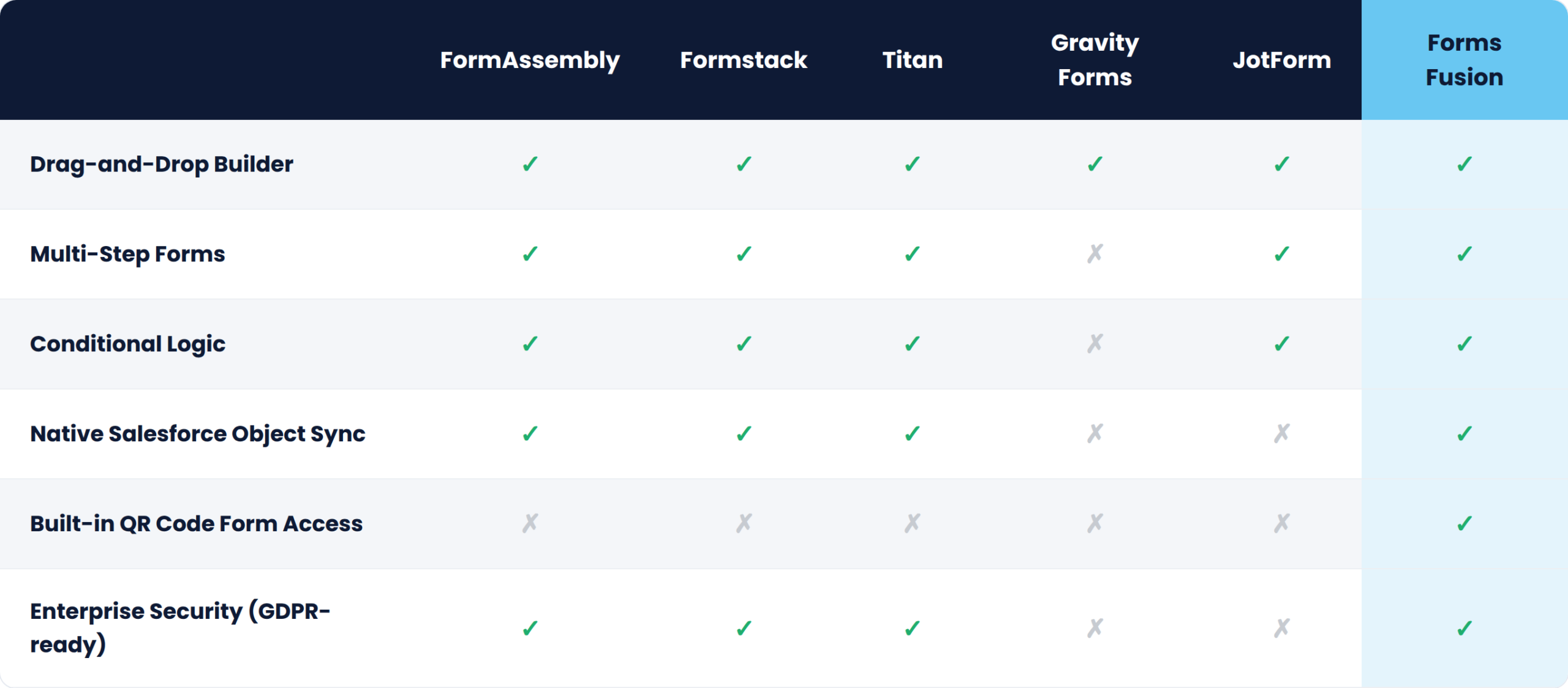
Feature Comparison Table
Why Forms Fusion Stands Out In Market
Launching in a crowded category is never easy but Forms Fusion was built around one idea: Salesforce form building shouldn’t require code, complexity, or a five-figure budget. Here’s why it’s gaining traction fast:
1. QR-Code-Native Forms No other major Salesforce form builder treats QR codes as a first-class feature. Every form you create in Forms Fusion gets an instant, scannable QR code perfect for events, print collateral, product packaging, in-store signage, or even business cards, all routing data directly into Salesforce.
2. Simple, No-Code Interface You don’t need to be a developer. If you can drag, drop, and click, you can build a Salesforce-connected form in minutes.
3. Native Salesforce Integration No clunky middleware or third-party connectors. Submissions flow straight into Leads, Contacts, Cases, or any custom object you choose.
4. Affordable for Growing Teams Unlike enterprise tools priced for Fortune 500 budgets, Forms Fusion is priced for startups, SMBs, and consultancies that need power without the premium.
5. Built for Online and Offline Capture Most form builders assume every lead starts on a website. Forms Fusion bridges physical and digital scan a QR code at a trade show booth, and the data lands in Salesforce in real time.
Use Cases for Salesforce Form Builders
Lead Capture Forms: Embed forms on your website or print them as QR codes on flyers and banners to automatically create Salesforce Leads.
Event Registration: Place a Forms Fusion QR code on event signage so attendees scan, register, and sync straight into Salesforce Campaigns no clipboard, no manual entry.
Customer Feedback: Collect NPS surveys, product reviews, or satisfaction scores, with QR codes on receipts or packaging for instant post-purchase feedback.
Internal Data Requests: Build internal forms for HR, IT, or operations teams, accessible via shared links or printed QR codes around the office.
Partner & Vendor Onboarding: Streamline applications and store details directly in Salesforce, with a shareable QR code for partner kits and onboarding packets.
Final Thoughts
Choosing the right Salesforce form builder doesn’t have to be overwhelming. Established players like FormAssembly, Formstack, and Titan are powerful, but they’re often too complex, too expensive, or too web-only for everyday businesses that also need to capture data offline. That’s where Forms Fusion comes in combining no-code simplicity, native Salesforce sync, and a QR-code-first approach that no other major competitor offers.
If you’re ready to make Salesforce form building effortless both online and off give Forms Fusion a try today.
Frequently Asked Questions
Everything you need to know about Salesforce Form Builders.
What is a Salesforce form builder, and why do I need one?
A Salesforce form builder is a tool that lets you create online (and increasingly offline) forms connected directly to Salesforce without writing code. It ensures accurate, real-time data entry into Salesforce while improving the experience for everyone filling out the form.
Which is the best Salesforce form builder?
It depends on your business size and requirements. Established tools like FormAssembly, Formstack, and Titan offer advanced capabilities but can be expensive and complex. If you want simplicity, affordability, and a unique advantage for offline lead capture, Forms Fusion stands out with its native QR code functionality.
How does Forms Fusion compare to other Salesforce form builders?
Forms Fusion combines a no-code drag-and-drop builder, native Salesforce object synchronization, multi-step forms, and conditional logic. It also offers a unique feature that many competitors don’t: built-in QR codes for every form, making offline and online data collection seamless.
Can Salesforce form builders handle advanced use cases like multi-step forms or conditional logic?
Yes. Modern Salesforce form builders, including Forms Fusion, support multi-step forms, conditional logic, file uploads, and real-time Salesforce updates. This makes it easy to build complex workflows without custom development.
Who should use Forms Fusion: small businesses or enterprises?
Forms Fusion is designed for both. Small businesses benefit from its affordability and quick setup, while enterprises appreciate its scalability and native Salesforce integration. Whether you’re collecting 50 leads at an event or managing thousands of submissions online, Forms Fusion grows with your business.
Does Forms Fusion work without an internet connection at events or in print?
Forms Fusion uses QR codes that open mobile-friendly web forms. While the device scanning the QR code requires an internet connection to load and submit the form, no app download or user login is needed, making the experience fast and frictionless for attendees, customers, and partners.