Install Forms Fusion today and start building smarter, faster, and effortless Salesforce forms.
Experience Forms Made Easy in Action – Book Your Demo Now
Salesforce Forms for Education give schools, colleges, universities, and training organizations a practical way to collect student information and connect that data with Salesforce. A well-designed form can capture registration details, admission enquiries, applications, event registrations, surveys, and other student information without forcing staff to re-enter data manually.
For simple registration and admissions workflows, a No Code Salesforce Form Builder can let Salesforce Admins create forms themselves using a drag-and-drop interface instead of waiting for a developer or consultant. The real value isn’t simply creating a nicer form; it’s getting submitted information into the right Salesforce records and keeping the process manageable for the team.
This guide explains how Salesforce forms can support education workflows, how to structure a student registration form, what Salesforce data should sit behind it, and how an admin can approach a self-service implementation.
Salesforce Forms for Education are online forms designed to collect education-related information and connect that information with Salesforce records and workflows. Depending on the implementation, a form can collect prospective student details, program preferences, contact information, registration data, feedback, or admissions information and send the resulting data into Salesforce.
This approach fits naturally with Salesforce’s education data architecture. Salesforce’s Education Data Architecture (EDA) provides a common data model for educational institutions and supports areas including recruiting and admissions, advising, registrar functions, faculty, and alumni activities.
The important distinction is that a form isn’t the CRM itself. It’s the data-entry layer between the person submitting information and the Salesforce environment where that information is stored, related, automated, reported on, and acted upon.
The main advantage of using Salesforce Forms for education is that submitted information can become usable Salesforce data instead of another spreadsheet or inbox attachment. That can reduce duplicate data entry and give admissions or administrative teams a more consistent way to capture information.
Consider a typical registration process:
The exact Salesforce records involved depend on the institution’s data model and implementation.
For example, Salesforce’s EDA documentation identifies Contact as the standard Salesforce object representing people in an educational institution, including students, family members, faculty, staff, and administrators. EDA also extends the Salesforce data model with education-specific objects and relationships.
That means an education form shouldn’t be designed in isolation. Before creating fields, decide where every important answer needs to live in Salesforce.
A student registration form should collect only the information required for the specific process and map each field to a defined Salesforce destination. Collecting everything “just in case” creates unnecessary complexity and can make the form harder for students to complete.
A basic registration form might include:
| Form Area | Example Information | Possible Salesforce Destination |
|---|---|---|
| Personal Details | First name, last name | Contact |
| Contact Details | Email, phone | Contact |
| Location | City, state, country | Contact/address fields |
| Academic Background | Qualification, institution | Education-specific/custom fields |
| Program Interest | Course or program | Appropriate education record |
| Intake Information | Preferred term or batch | Relevant education/custom record |
| Consent | Communication preference | Appropriate consent/preference field |
| Additional Information | Questions or comments | Custom field or related record |
The Salesforce destination should always be confirmed against the institution’s actual Salesforce configuration. EDA is customizable, and Salesforce recommends reviewing security, navigation, layouts, and configuration for Contact and other records rather than assuming every education org has an identical structure.
This is an easy mistake.
A course enquiry, campus event registration, student registration, and formal admission application may require completely different data models.
For example:
Salesforce Education Cloud itself includes specialized recruitment and admissions capabilities, including an online portal through which learners can request information, apply for admission, upload admissions documents, and schedule appointments.
So a lightweight form should complement the broader admissions architecture rather than pretending to replace it.
Salesforce data collection in education works by capturing information at the point of interaction and mapping that information into Salesforce objects, fields, and related records. The quality of the final Salesforce data depends heavily on the form’s field design, validation, mapping, permissions, and duplicate-handling strategy.
A simplified architecture looks like this:
Student → Online Form → Field Mapping → Salesforce → Automation → Admissions/Staff
For an education organization using EDA, the underlying model can include standard Salesforce objects such as Accounts and Contacts alongside education-specific objects and relationships. Salesforce describes EDA as a flexible architecture that can be customized for different educational use cases.
This matters because “send form data to Salesforce” isn’t a complete technical requirement.
You should define:
Answer those questions first. The form builder comes second.
A no-code Salesforce form builder lets Salesforce users create and configure forms through a visual interface instead of writing custom application code for every form. A drag and drop form builder typically lets an administrator add fields, organize the form, configure validation, and map collected information to Salesforce.
That’s particularly useful for straightforward education workflows.
Imagine an admissions coordinator says:
“We need a new registration form for our summer program.”
With a traditional development-heavy approach, that request may become a development ticket, requirements discussion, development work, testing, deployment, and ongoing maintenance.
With a suitable No Code Salesforce Form Builder, an administrator may be able to:
The exact capabilities depend on the selected form solution and Salesforce configuration.
Our view: if your process is simple, you genuinely don’t need a developer for every form. But if you’re building complex approval chains, sophisticated integrations, advanced security requirements, or highly customized admissions logic, expert Salesforce help can still be the right choice.
You can approach a simple Salesforce education form as a five-stage configuration exercise: define the process, build the form, map Salesforce fields, test the submission, and publish it.
Start with one process.
For example:
“Collect registrations for prospective students interested in the BBA program.”
Don’t begin with 50 fields. Decide what the form needs to accomplish.
Use only the fields necessary for that process.
For example:
Use the right field type wherever possible. A program-selection question should generally be a controlled selection rather than a free-text field if the available programs are predefined.
This is where the form becomes a Salesforce data-collection tool.
For example:
Form: Email → Salesforce: Email
Form: Phone → Salesforce: Phone
Form: First Name → Salesforce: First Name
The exact mapping depends on your Salesforce objects, fields, record model, and form solution.
Don’t test only whether the “Thank You” message appears.
Check the Salesforce record.
Verify:
Once the form works correctly, publish it where students can find it.
That could be:
Then periodically review the Salesforce data. A form that technically works can still create poor CRM data if the fields and mappings weren’t designed carefully.
The difference between a traditional form workflow and a no-code Salesforce form workflow is primarily who can manage the form and how directly the submission connects to Salesforce.
| Area | Traditional Development Approach | No-Code Salesforce Form Approach |
|---|---|---|
| Form Creation | Developer involvement may be required | Admin can often configure visually |
| Field Changes | Development/testing may be required | Admin can typically modify fields |
| Salesforce Mapping | Developer/configuration work | Visual mapping where supported |
| Simple Registration Forms | Can be more effort than necessary | Well suited to self-service |
| Complex Integrations | Developer expertise may be appropriate | May still require technical expertise |
| Testing | Development + QA workflow | Admin-led testing for simple forms |
| Maintenance | Often dependent on technical resources | More accessible to Salesforce admins |
| Deployment | Depends on implementation | Can be faster for simple use cases |
This doesn’t mean no-code is automatically better for every project. The correct choice depends on complexity, security, integrations, data architecture, and governance.
Salesforce forms can support many education data-collection workflows, from simple enquiries and event registration to structured student and admissions processes. The best design depends on what happens to the information after submission.
Common use cases include:
Collect basic student information and program preferences before an enrollment or registration process.
Give prospective students a structured way to request information about programs, campuses, fees, or admissions.
Collect information associated with interest or registration for a course, training program, or academic offering.
Capture registrations for open days, webinars, orientations, workshops, and other events.
Collect structured feedback after courses, events, services, or interactions.
Build forms for internal or external surveys and connect responses to Salesforce data where appropriate.
For organizations using Salesforce as part of a broader admissions architecture, forms can serve as one data-collection component within the application journey.
Education Cloud provides specialized recruitment and admissions functionality, while EDA provides an extensible education data architecture. A form should therefore be selected and configured based on the organization’s broader Salesforce implementation.
A good Salesforce admissions form minimizes unnecessary questions while collecting the information required for the next operational step. Form length isn’t the only consideration; field relevance, validation, mobile usability, data mapping, and the applicant’s context all affect the experience.
A practical structure could be:
For larger applications, consider whether all information should be collected on one page.
A multi-step process can make a complex application easier to understand, provided the implementation supports it.
Before publishing a Salesforce education form, an admin should validate data mapping, permissions, required fields, duplicate handling, and the complete submission-to-Salesforce workflow.
Use this pre-launch checklist:
Security deserves particular attention when collecting student information. Salesforce’s EDA documentation specifically includes guidance around setting up security and configuring permissions for users in an educational institution.
Don’t assume that a public form is secure simply because it connects to Salesforce. Review the complete architecture, access controls, authentication requirements, data exposure, and compliance obligations applicable to your institution.
No, a no-code form builder and Salesforce Education Cloud solve different problems. A form builder focuses on collecting information, while Education Cloud provides broader capabilities for education processes including recruitment and admissions, academic operations, student success, and other institutional workflows.
Salesforce describes Education Cloud as using the Salesforce platform with a specialized education data model and capabilities across the learner journey.
Think about it this way:
Form = data collection interface
Salesforce = CRM/data platform
Education Cloud = specialized education capabilities and data model
A no-code form can be one component of that architecture.
Self-service form creation gives Salesforce Admins more control over routine data-collection changes without making every small request a development project.
Education teams rarely have only one form.
A university might need separate forms for:
If every change requires custom development, even a small label or field change can become operational overhead.
That’s where no-code becomes practical.
The goal isn’t “never use developers.” The goal is use development resources where their expertise adds value.
If an admin can safely create a straightforward registration form without code, let them.
If the requirement involves complex integrations, sophisticated business logic, custom Apex, unusual security requirements, or complicated data transformations, bring in the right technical resource.
That’s a healthier Salesforce operating model.
Forms Fusion is designed around the idea that Salesforce teams should be able to create no-code forms, connect them to Salesforce, and collect information without building every form from scratch.
For a straightforward education workflow, the practical objective is simple:
Build → Map → Test → Publish → Collect → Sync
That model works particularly well for organizations that need multiple forms but don’t want every form request to become a custom development engagement.
For teams evaluating Salesforce Form Solutions, the key questions should be:
If the answer is yes, you’re moving toward a genuinely self-service form strategy rather than simply replacing one standalone form with another.
For organizations ready to evaluate the implementation and commercial options, consider linking this section to Forms Fusion pricing.
Salesforce Forms for Education can simplify student registration and admissions by turning online data collection into a connected Salesforce workflow. The strongest implementations don’t start with form design; they start by defining the student journey, Salesforce data model, required fields, security requirements, and what should happen after submission.
For simple processes, a No Code Salesforce Form Builder can give Salesforce Admins the ability to build and publish forms without waiting for development resources.
And that’s the real opportunity: not just creating forms faster, but giving education teams a practical way to manage their own Salesforce data-collection workflows.
If you’re starting with a simple registration, enquiry, event, or student feedback process, build one form first. Test the entire journey. Once the model works, expand it to the next use case.
If you’d like to see how a no-code approach can work with your Salesforce environment, explore Forms Fusion and start with a workflow your team currently manages manually.
Healthcare organizations collect sensitive information every day, from patient registrations and medical histories to consent forms and follow-up questionnaires. Salesforce Forms for Healthcare allow organizations to collect this data securely and send it directly into Salesforce without relying on paper forms, manual data entry, or custom development.
If you’re a Salesforce Admin, healthcare IT leader, or clinic owner, you don’t necessarily need a developer to build secure patient intake forms anymore. Modern no-code Salesforce form builders let you create, publish, and connect forms to Salesforce in minutes while maintaining data accuracy and improving operational efficiency.
In this guide, you’ll learn how Salesforce forms work in healthcare, what security considerations matter, how to build your first patient form without code, and why a DIY approach can dramatically reduce implementation time for many common healthcare workflows.
Accurate patient data collection directly impacts operational efficiency, patient experience, and data quality inside Salesforce.
Many healthcare providers still rely on PDFs, spreadsheets, email attachments, or disconnected web forms. These methods often create duplicate records, require manual entry, and increase administrative effort.
Common healthcare forms include:
When these forms aren’t connected to Salesforce, staff often spend valuable time copying information into CRM records instead of focusing on patient care.
Salesforce Forms for Healthcare are digital forms that collect patient information and automatically create or update Salesforce records without manual data entry.
Unlike traditional website forms that require middleware or CSV imports, modern Salesforce form solutions communicate directly with Salesforce objects.
Depending on your Salesforce configuration, a form can write data into standard objects like:
Or healthcare-specific custom objects created by your organization.
Many organizations using Salesforce Healthcare Cloud also extend forms to support healthcare-specific workflows using custom objects and automation built with Salesforce Flow.
A no-code Salesforce form builder enables administrators to build and publish forms without writing Apex, Visualforce, or Lightning Web Components.
For many healthcare organizations, the biggest bottleneck isn’t technology—it’s waiting for development resources.
A no-code approach allows administrators to:
We’ve seen teams spend weeks waiting for custom development when their requirements were actually simple enough to configure themselves in less than an hour.
That said, if you’re implementing highly customized approval chains, advanced integrations, or complex clinical workflows, experienced Salesforce developers may still be the right choice. Also read about Salesforce Forms for Retail.
Connected forms eliminate duplicate data entry by sending patient information directly into Salesforce at the time of submission.
Instead of collecting information in one system and transferring it later, healthcare teams receive structured data immediately.
Benefits include:
Patients complete forms before arriving, reducing front-desk workload.
Validation rules reduce incomplete or incorrectly formatted submissions.
Staff spend less time entering information manually.
Patients can complete forms from smartphones, tablets, or desktop devices.
Salesforce Flow can trigger notifications, record updates, task creation, or follow-up actions after submission.
Most healthcare registration forms can be created without code by mapping form fields directly to Salesforce objects.
A typical workflow looks like this:
Decide whether submissions should create or update:
Drag and drop fields such as:
Require important fields.
Validate:
Show additional questions only when needed.
Examples:
Connect each field to the appropriate Salesforce object field.
This ensures submissions automatically populate Salesforce records without manual intervention.
Share the form using:
Patients can submit information from virtually any device.
Direct Salesforce integration removes several manual steps that exist in traditional patient intake processes.
| Traditional Process | Salesforce Forms for Healthcare |
| Paper forms | Digital forms |
| Manual data entry | Automatic Salesforce updates |
| Staff retyping information | Direct field mapping |
| Limited mobile experience | Mobile-friendly forms |
| Delayed processing | Real-time submissions |
| Printing and scanning | Digital records |
| Difficult updates | Quick no-code modifications |
This type of workflow improvement is one reason many organizations are replacing disconnected forms with Salesforce-native solutions.
Healthcare forms should protect sensitive information throughout collection, transmission, and storage.
Security considerations include:
Organizations handling protected health information (PHI) should also evaluate their compliance obligations, including applicable regulations and internal security policies.
If your organization requires HIPAA compliance, ensure both your Salesforce implementation and any connected applications support your organization’s compliance requirements. Compliance depends on your overall implementation and contractual arrangements—not simply on using a form builder.
Nearly every patient-facing healthcare department can benefit from connected Salesforce forms.
Common use cases include:
The best Salesforce form builder for Healthcare should simplify administration while maintaining secure Salesforce integration.
Look for features including:
These capabilities help administrators launch forms faster while reducing reliance on development teams.
Many healthcare intake forms don’t require custom development and can be deployed by Salesforce administrators.
That’s an important distinction because many organizations assume every Salesforce form project requires consultants or lengthy implementation cycles.
For common use cases like patient registration, appointment requests, consent forms, and feedback surveys, a no-code approach is often sufficient. Administrators can make updates themselves as requirements evolve instead of submitting development requests for every small change.
The result is faster iteration, lower maintenance overhead, and greater flexibility.
Forms Fusion is designed for organizations that want to create Salesforce-connected forms quickly without complex implementation projects.
Key capabilities include:
Rather than depending on developers for every update, administrators can build, publish, and modify forms themselves as business requirements change.
Salesforce Forms for Healthcare simplify secure patient data collection by connecting digital forms directly with Salesforce. Instead of relying on manual data entry, healthcare teams can automate registration, improve data quality, and reduce administrative work.
For many organizations, the biggest advantage isn’t just automation—it’s independence. If your workflow is relatively straightforward, you can often build, deploy, and update healthcare forms yourself without waiting for custom development. That makes it easier to respond quickly as patient needs and operational processes evolve.
If you’re looking for a practical no code Salesforce form builder for Healthcare, Forms Fusion provides an approachable way to create secure, Salesforce-connected forms that administrators can manage with confidence.
Find answers to common questions about Salesforce Forms for Healthcare.
Salesforce Forms for Healthcare are digital forms that collect patient information and automatically create or update Salesforce records. They help healthcare organizations reduce manual data entry while improving data accuracy and workflow efficiency.
Yes. A no-code Salesforce Form Builder allows administrators to create patient registration forms, appointment requests, consent forms, and other healthcare forms using drag-and-drop tools without writing Apex or custom code.
Yes. Modern Salesforce Form Builders can map form fields directly to standard Salesforce objects such as Contact, Lead, and Case, as well as custom objects created for healthcare workflows.
Yes. Salesforce-connected forms help healthcare organizations collect patient information digitally, reduce duplicate data entry, validate submissions, and automate Salesforce workflows. Organizations should ensure their overall implementation meets applicable security and compliance requirements.
Important features include drag-and-drop form creation, Salesforce object mapping, conditional logic, validation rules, mobile responsiveness, QR code access, multi-page forms, and support for both standard and custom Salesforce objects.
For many common healthcare workflows, no-code tools allow Salesforce administrators to build and deploy forms much faster than custom development. Complex integrations or specialized approval processes may still require developer involvement.
Retail and eCommerce businesses generate customer, order, inventory, and service data every day. A Salesforce Form for Retail & Ecommerce Industry enables businesses to capture this information directly into Salesforce without manual data entry. Using a No Code Salesforce Form Builder, retailers can create, customize, and deploy forms in minutes while keeping customer data accurate and centralized.
In this guide, you’ll learn how Salesforce forms work for retail businesses, their key use cases, and how Forms Fusion helps you build powerful forms without writing a single line of code.
Retail businesses often rely on multiple channels to collect customer and operational data, including websites, physical stores, support teams, and warehouse staff. When this information is stored in spreadsheets or disconnected applications, it creates duplicate records, delays, and manual work.
A Salesforce Form Builder for Retail connects every submission directly to Salesforce. Whether it’s a customer inquiry, warranty claim, loyalty registration, or inventory update, the data is automatically stored in the appropriate Salesforce object, helping teams work faster and make better decisions.
A Salesforce Form for Retail & Ecommerce Industry can simplify a wide range of business processes, including:
Because every submission syncs directly with Salesforce, teams spend less time entering data manually and more time serving customers.
A No Code Salesforce Form Builder allows Salesforce Admins and business users to create forms using a simple drag-and-drop interface.
Instead of writing Apex code or relying on developers, users can:
This approach makes Salesforce data collection faster, easier, and more scalable for growing retail businesses.
Retail businesses collect information from online stores, in-store promotions, customer support, and marketing campaigns. Salesforce forms centralize this data and reduce duplicate entries.
Short, mobile-friendly forms with conditional logic make it easier for customers to complete registrations, provide feedback, or request support.
Warehouse and store teams can submit inventory updates directly from mobile devices. This improves stock visibility and reduces manual reporting errors.
Once a form is submitted, Salesforce can automatically trigger notifications, create records, assign tasks, or launch approval processes using Flow Automation.
Sales associates, warehouse teams, and field staff can complete forms from smartphones or tablets, making operations more efficient regardless of location.
Forms Fusion is a No Code Salesforce Form Builder designed to help organizations create Salesforce-connected forms quickly without technical complexity.
With Forms Fusion, you can:
Whether you’re launching a customer registration form or managing store operations, Forms Fusion enables you to deploy forms in minutes instead of days.
| Traditional Forms | No-Code Salesforce Forms |
| Manual data entry | Automatic Salesforce synchronization |
| Multiple disconnected tools | Single Salesforce platform |
| Higher risk of errors | Improved data accuracy |
| Developer involvement | Admin-friendly drag-and-drop builder |
| Limited automation | Workflow and Flow automation support |
| Difficult to scale | Easily reusable and customizable |
To get the most value from your Salesforce forms:
Following these practices helps improve user experience while ensuring high-quality Salesforce data.
A Salesforce Form for Retail & Ecommerce Industry helps businesses streamline customer interactions, automate operational workflows, and improve data accuracy by connecting every submission directly with Salesforce. Instead of relying on spreadsheets or disconnected applications, retailers can centralize data collection, reduce manual work, and enhance customer experiences.
With Forms Fusion, businesses can create professional Salesforce forms using a drag-and-drop interface, automate workflows, generate QR Code-enabled forms, and deploy secure, mobile-friendly forms in minutes. If you’re looking for a simple and scalable way to modernize your retail operations, a no-code Salesforce form builder is an excellent place to start.
Everything you need to know about Salesforce forms for the retail and eCommerce industry.
A Salesforce form is a digital form that connects directly with Salesforce, enabling retailers and eCommerce businesses to capture customer, order, inventory, and operational data automatically without manual data entry.
Yes. With a no-code Salesforce Form Builder like Forms Fusion, Salesforce administrators can create, customize, and publish forms using a simple drag-and-drop interface without writing Apex or custom code.
Salesforce forms can connect to standard objects such as Lead, Contact, Account, Opportunity, Case, Order, and Product, as well as custom objects tailored to your retail or eCommerce business processes.
Yes. Modern Salesforce form solutions are fully responsive and optimized for desktops, tablets, and smartphones, allowing employees and customers to submit information anytime and from any device.
Every Salesforce team eventually runs into the same challenge. A department needs a new customer registration form, partner onboarding form, event registration form, inspection checklist, or lead capture form. The request seems simple, but it often ends up waiting in a developer backlog for days or even weeks.
For many organizations, that’s where productivity slows down.
A No Code Salesforce Form Builder changes that workflow completely. Instead of depending on developers, Salesforce admins and business users can design, publish, and connect forms directly to Salesforce using visual tools. The result is faster deployment, fewer IT bottlenecks, and better collaboration across teams.
In this guide, we’ll explore what makes a no-code Salesforce form builder valuable, compare common approaches, and explain why Forms Fusion is designed for teams that want to build and deploy Salesforce forms themselves in minutes.
A No Code Salesforce Form Builder is a visual platform that lets users create forms connected to Salesforce without writing Apex, Visualforce, Lightning Web Components, or custom code.
Instead of development work, users configure forms using drag-and-drop components, field mapping, validation rules, conditional logic, and Salesforce object connections.
Typical use cases include:
For many everyday business processes, these forms can be built entirely without developer involvement.
Most business requests don’t require custom application development.
They simply require collecting data and saving it correctly inside Salesforce.
Traditional development often introduces delays because developers may already be working on:
Meanwhile, operations teams are waiting for a basic form.
A visual Salesforce form builder removes this dependency, allowing admins to publish forms much faster while maintaining Salesforce data integrity.
We’ve seen many organizations discover that once their forms become self-service, developers can focus on higher-value technical projects instead of routine data collection requests.
A modern Salesforce form solution should reduce complexity rather than introduce it.
Look for features such as:
The goal isn’t simply creating forms.
It’s creating forms that work naturally with Salesforce data while remaining easy enough for non-technical users to maintain.
Different organizations solve this challenge in different ways. Each approach has strengths depending on the complexity of the project.
Forms Fusion is a No Code Salesforce Form Builder designed for teams that want to build, publish, and manage Salesforce forms without relying on developers. Its intuitive drag-and-drop builder enables Salesforce admins, operations teams, and business users to create forms quickly while keeping data synchronized with Salesforce.
Unlike traditional approaches that often require custom development or lengthy setup, Forms Fusion focuses on self-service deployment. Users can create mobile-friendly forms, generate QR code forms for instant access, apply conditional logic, build multi-page forms, and collect external data—all through a visual interface.
Forms Fusion is particularly valuable for organizations that need to launch forms rapidly for lead capture, customer onboarding, event registrations, inspections, surveys, and service requests while maintaining accurate Salesforce data collection.
Best suited for:
FormAssembly is a well-known Salesforce-connected form platform used across many industries.
It supports advanced Salesforce integrations, conditional logic, approvals, and multi-object data handling. Organizations with sophisticated compliance requirements often evaluate FormAssembly because of its mature enterprise capabilities.
It works well for businesses needing highly configurable workflows across Salesforce.
Titan provides a native Salesforce AppExchange solution focused on forms, documents, and workflow automation.
Its visual builder allows Salesforce admins to create business processes without extensive coding. Titan is frequently evaluated by organizations looking for document-heavy Salesforce workflows.
Formstack offers online forms with Salesforce connectivity along with broader workflow automation capabilities.
It serves organizations across multiple industries and supports various integrations beyond Salesforce, making it suitable for businesses using diverse software ecosystems.
A No Code Salesforce Form Builder shouldn’t require weeks of onboarding before someone can build their first form.
Forms Fusion is designed around one core idea:
Business users should be able to create, publish, and connect Salesforce forms themselves.
Instead of lengthy implementation projects, Forms Fusion emphasizes a DIY experience where admins can configure forms visually and deploy them quickly.
Key capabilities include:
The focus is reducing technical barriers so teams can respond faster to business needs.
| Feature | Salesforce Flow | FormAssembly | Titan | Formstack | Forms Fusion |
| No-code setup | Yes (basic scenarios) | Yes | Yes | Yes | Yes |
| Drag-and-drop builder | Limited | Yes | Yes | Yes | Yes |
| QR code forms | Limited | Depends on implementation | Limited | Limited | Yes |
| Native Salesforce integration | Yes | Yes | Yes | Yes | Yes |
| Public forms | Requires configuration | Yes | Yes | Yes | Yes |
| Conditional logic | Yes | Yes | Yes | Yes | Yes |
| Mobile responsive | Depends on implementation | Yes | Yes | Yes | Yes |
| Designed for quick self-service deployment | Moderate | Moderate | Moderate | Moderate | High |
Every platform serves different business needs. The best choice depends on your organization’s processes, technical expertise, governance requirements, and desired level of self-service.
QR code forms allow users to open Salesforce-connected forms instantly by scanning a QR code with a mobile device.
This approach is especially useful for:
Instead of sharing lengthy URLs, teams simply print or display a QR code that launches the correct Salesforce form immediately.
For many common business processes, yes.
If your goal is collecting information and storing it in Salesforce, modern no-code platforms make that entirely achievable for Salesforce admins and operations teams.
That said, there are situations where technical expertise still matters.
Complex integrations, custom Apex logic, sophisticated approval chains, or highly customized business processes may still require experienced Salesforce developers. The advantage of a no-code platform is that it removes developers from routine form requests, allowing them to focus on work that truly requires engineering.
Forms Fusion is built for organizations that want to reduce dependence on technical resources while maintaining accurate Salesforce data collection.
Using its visual builder, teams can:
Instead of waiting for development cycles, business users can respond to operational needs immediately.
A No Code Salesforce Form Builder isn’t just about avoiding code. It’s about giving business teams the ability to solve everyday challenges without creating unnecessary development bottlenecks.
While Forms Fusion, FormAssembly, Titan, and Formstack each provide valuable capabilities, organizations increasingly want platforms that prioritize speed, simplicity, and self-service.
For teams that want to build, publish, and manage Salesforce forms independently, Forms Fusion offers a practical approach that combines drag-and-drop design, native Salesforce connectivity, QR code forms, and rapid deployment into a single solution.
When your next form request arrives, it shouldn’t have to wait for the next developer sprint.
Find answers to common questions about no-code Salesforce Form Builders.
Yes. Modern Salesforce Form Builders allow administrators to design, customize, and publish forms using an intuitive visual interface. Developer involvement is typically only needed for highly customized workflows, advanced integrations, or complex business logic.
QR code forms generate a unique QR code that opens a Salesforce-connected form on any mobile device. They are widely used for event registrations, inspections, customer feedback, surveys, lead capture, and field data collection.
Yes. Most no-code Salesforce Form Builders support secure public forms, allowing customers, partners, vendors, job applicants, and other external users to submit information directly into Salesforce without requiring a Salesforce login.
A no-code form builder is ideal for standard data collection, workflow automation, and Salesforce record creation. However, if your project requires advanced Apex development, highly customized business logic, complex integrations, or enterprise-level automation, working with a Salesforce developer is the better choice.
A no code Salesforce form builder lets you create, publish, and connect forms directly to Salesforce objects — no Apex, no developer, no ticket in someone else’s queue. You drag fields onto a canvas, map them to Salesforce, and publish. That’s the whole workflow, and for most admins, it fits inside a coffee break.
This isn’t a theoretical pitch. We’ve watched Salesforce admins go from “I need a lead capture form” to a live, tested form connected to their org in under 20 minutes — using nothing but a browser. In this article, we’ll walk through the core features that make that possible: drag and drop design, native Salesforce data mapping, QR code deployment, validation logic, and the things a form builder needs to actually hold up in production, not just in a demo.
A no-code Salesforce form builder is a tool that lets non-developers create forms which write data directly into Salesforce records — Leads, Contacts, Cases, or custom objects — without writing Apex, Visualforce, or JavaScript. Instead of code, you configure the form visually: fields, logic, and object mapping are all handled through clicks, not classes.
This matters because traditional Salesforce form development usually means a developer builds a Visualforce page or Lightning Web Component, tests it in a sandbox, and deploys it through a change set — a process that can take days for something as simple as a contact form. No-code tools collapse that timeline because the “build” and the “deployment” are the same step.
The drag-and-drop canvas is the entry point for every no-code Salesforce form builder, and it’s the feature that removes the developer dependency entirely. You place field elements — text, dropdown, checkbox, file upload, signature — directly onto a form layout and reorder them by dragging, the same way you’d rearrange tiles on a dashboard.
What separates a good drag-and-drop builder from a basic one is field-level control: conditional visibility (show Field B only if Field A equals a certain value), required-field toggles, and default values you can set without touching a formula editor. If your form logic is genuinely simple — a lead capture form, an event RSVP, a feedback survey — you honestly don’t need anything more sophisticated than this. But if you’re building multi-step approval workflows with branching logic across a dozen fields, you’ll still want an admin who understands your data model reviewing the field mapping before you publish.
This is the feature that separates a “Salesforce form builder” from a generic form tool with a Salesforce plugin bolted on. Native data mapping means each form field is bound directly to a Salesforce field — on standard objects like Lead, Contact, and Case, or on any custom object in your org — so a submission becomes a live Salesforce record the instant it’s submitted, not a CSV you import later.
Look for support for picklists (single and multi-select), lookup relationships, record types, and custom fields, since these are where generic form tools typically fall short. A form builder that can only write to flat text fields will eventually force you back to manual data cleanup, which defeats the purpose of going no-code in the first place.
QR code forms solve a specific, common problem: collecting Salesforce data in places where sending someone a link isn’t practical — a trade show booth, a retail counter, a job site, a printed flyer. The form builder generates a scannable QR code tied to your published form; scanning it opens the form on any phone browser, and submissions flow into Salesforce the same way a web-submitted form would.
For field teams, this closes a gap that traditional web forms don’t: no email to send, no link to type, no app to install. Print the code on a badge, a table tent, or a work order, and data collection starts working the moment someone scans it.
Validation rules stop bad data before it reaches Salesforce — required fields, format checks (email, phone, number ranges), and duplicate-prevention logic that flags a submission before it creates a redundant Lead or Contact. Conditional logic goes a step further, showing or hiding fields based on prior answers so the form stays short for each individual respondent even if the full field set is large.
This is where a no-code builder starts to look like a lightweight version of a Salesforce Flow — without requiring you to open Flow Builder at all. For teams with genuinely complex branching (say, routing based on 15+ combinations of answers), it’s worth pressure-testing the logic in a sandbox before going live, even though no code was technically written.
Publishing should be a single action that generates a shareable link, an embeddable snippet, and — where supported — a QR code, all pointing to the same live form. Look for embed options that work on standard web pages (an iframe or JavaScript snippet) as well as on Salesforce Experience Cloud sites, since many teams need the form to live both on their public website and inside a customer portal.
| Traditional (Developer-Built) | No-Code Salesforce Form Builder | |
| Time to launch | Days to weeks (build, sandbox test, deploy) | Minutes to hours |
| Who can build it | Salesforce developer / consultant | Admin or business user |
| Deployment method | Change sets / metadata deployment | Publish button |
| Field mapping | Manual Apex/VF binding | Point-and-click mapping to objects |
| Offline/on-site collection | Custom-built (extra dev work) | Built-in QR code generation |
| Ongoing edits | Requires a new dev cycle | Self-service, no redeploy needed |
| Best fit | Complex, multi-object approval logic | Standard data capture, lead/case intake, surveys |
You create a Salesforce form without code by selecting an object to connect to, dragging in the fields you need, mapping each one to a Salesforce field, and publishing. The entire sequence — object selection, field placement, mapping, and publish — is designed to happen in a single session, typically without leaving the browser tab.
Salesforce admins juggling multiple form requests, small businesses without a dedicated developer, and IT teams that want to reduce change-set backlog are the clearest fits. If your organization’s forms are mostly standard data capture — leads, cases, event sign-ups, feedback — a no-code tool will very likely cover 90% of your needs. Complex, cross-object approval chains are the exception where you’ll still want a consultant’s eye on the build, even if the final form is assembled without code. Know Salesforce Form builder price.
A no-code Salesforce form builder works because it collapses form design, Salesforce field mapping, and deployment into one self-serve step — drag-and-drop fields, native object mapping, QR code generation, and built-in validation are what make that possible, not just a friendlier interface bolted onto the old process. For standard data capture — leads, cases, event sign-ups, on-site collection — this is genuinely all you need, and you can skip the developer queue entirely.
That said, no-code isn’t “no thought.” Complex approval chains and heavy branching logic still benefit from an admin’s review before you publish, even when the build itself required zero code. The honest takeaway: start simple, publish fast, and bring in expert eyes only when the logic actually calls for it.
If you’re ready to stop waiting on a change set for a form you could build yourself, that’s exactly the gap Forms Fusion is built to close.
The core benefit of a no code Salesforce form builder is that it removes the developer bottleneck from form creation—admins and business users can build, test, and publish a Salesforce-connected form in minutes instead of waiting on a development queue. That single shift cascades into faster launches, lower costs, fewer broken integrations, and data that lands in Salesforce the moment it’s submitted, not hours later.
This article breaks down the concrete benefits teams actually experience after switching—not vague productivity claims, but the specific operational and technical wins: speed, cost, data accuracy, mobile capture, and where the limits of no code still sit. If you already know what a no code Salesforce form builder is, skip to the benefit that matters most to your team.
The main benefits are faster deployment, lower total cost, native real-time data sync, reduced IT dependency, better field-level data capture, and easier long-term maintenance. Each of these solves a specific pain point teams hit with traditional Visualforce development or third-party connected form tools. Below, each benefit is broken out on its own, because they don’t all matter equally depending on your team size and use case.
A form that used to sit in a developer’s backlog for one to two sprints can go live the same day with a no code builder, since there’s no code to write, review, or deploy. You drag fields onto a canvas, map them to your Salesforce object, set validation rules, and publish. For time-sensitive needs—an event registration form, a product recall intake, a last-minute campaign—that speed difference is the entire value proposition.
We’ve seen marketing teams spin up a lead capture form for a same-week campaign launch that would have missed the campaign window entirely under the old dev-ticket model.
Every form change under a traditional build means developer hours—initial build, QA, and every subsequent tweak. A no code form builder shifts that cost from ongoing dev time to a flat subscription, and the admin who owns the form can edit it directly without opening a new ticket. Over a year of routine changes (new fields, updated picklists, tweaked logic), that adds up to real savings, particularly for teams running dozens of forms across departments.
[INTERNAL LINK: anchor text — “compare no code form builder pricing tiers”] → Forms Fusion pricing page
Because a native no code form builder is built directly on the Salesforce platform, form submissions write to Salesforce objects immediately through the platform’s own API—there’s no external database and no middleware sync delay. This matters more than it sounds: connected tools that live outside Salesforce (synced via Zapier or similar middleware) can lag by minutes or hours, and that sync layer is one more thing that can silently break during an API version update.
Admins and business users can build and maintain their own forms without filing a ticket, which frees IT and development resources for higher-value work. This doesn’t mean IT disappears from the picture—it means routine form requests stop competing with product roadmap work for developer attention. For smaller Salesforce teams especially, this is often the single biggest operational relief.
QR-code-triggered forms let field teams capture data directly against a Salesforce record from a phone, without a custom mobile app build. Scan a code on an asset, piece of equipment, or event badge, and a pre-populated form tied to that record opens instantly. This closes a gap that traditional form tools rarely solve well: getting accurate, real-time data from the field into Salesforce without a separate mobile development effort.
Because form fields pull directly from your Salesforce field metadata—picklist values, required fields, data types—there’s less risk of malformed data entering your org compared to a generic external form tool that requires manual field mapping. This reduces the data-cleanup work admins would otherwise do after the fact.
Vendor-maintained no-code tools absorb the burden of keeping pace with Salesforce API and platform updates, rather than leaving that risk with an internal team maintaining custom Apex or Visualforce code. Custom-built forms that go unmaintained are a common source of quiet breakage after a Salesforce release; a maintained no-code platform is built to keep working across those updates.
That said, it’s worth being direct here: for genuinely complex, multi-object approval workflows with heavy conditional logic, a no-code tool alone won’t replace the judgment of an experienced admin or consultant designing the underlying data model. No-code removes the coding barrier, not the need for good process design.
| Benefit | Traditional (Custom Dev) | No-Code Salesforce Form Builder |
| Time to launch | Days to weeks | Minutes to hours |
| Cost per change | Developer hours, billed | Included, self-serve |
| Data sync speed | Depends on build | Real-time (native tools) |
| IT involvement | Required for every change | Only for complex logic |
| Mobile/field capture | Custom build required | Often built-in (e.g., QR triggers) |
| Maintenance burden | Falls on internal team | Handled by vendor |
| Best fit | Complex, multi-object workflows | Standard intake, surveys, field data |
Salesforce admins managing frequent form requests, small business owners without a dedicated developer, and field teams needing mobile data capture see the most immediate benefit. IT decision-makers benefit indirectly, since offloading routine form work frees development capacity for higher-priority projects. Teams with genuinely complex approval chains benefit too, but should expect to pair the tool with admin or consultant expertise for the logic design, even if the form itself is no-code.
For a closer look at implementation specifics, see Salesforce Form Builder: Build No-Code Forms in Minutes.
A no-code Salesforce form builder doesn’t just save time—it changes who’s allowed to build a form in the first place. Speed, cost, real-time data sync, and mobile capture all follow from that one shift: the admin who understands the process can now build the form themselves, without a developer in the loop for every change. The tradeoff is honest, not hidden—genuinely complex approval logic still benefits from expert design work. But for the intake forms, surveys, and field data capture that make up most of what teams actually build, the developer bottleneck is no longer necessary.
If your team is still routing every form request through a dev queue, that’s usually the clearest sign it’s worth testing a no code builder on one low-risk form first, and expanding from there once you’ve seen the time and cost difference firsthand.
If you’ve ever waited weeks for IT to build a simple intake form in Salesforce, you already know the problem: most form tools either need a developer to configure, or they dump data into a spreadsheet you have to import by hand later. A true no-code Salesforce Form Builder skips both headaches — you build the form yourself, in your browser, and submissions land directly in the right Salesforce object the moment someone hits submit.
That’s the promise of tools built specifically for Salesforce rather than bolted onto it. In this guide, we’ll walk through what a no-code Salesforce form builder actually is, how it’s different from general-purpose form tools, what you can realistically build without code, and how to get your first form live today.
A no-code Salesforce Form Builder is a drag-and-drop tool that lets you design a web form and connect its fields directly to Salesforce objects — Leads, Contacts, Cases,
or custom objects — without writing Apex or configuring a middleware integration. You build the form visually, map each field to a Salesforce field, and publish it as a link, embed, or QR code.
The key difference from a generic form tool (Google Forms, Typeform, JotForm) is the native mapping layer. General tools capture data into their own database first; getting that data into Salesforce then needs a separate sync, a Zapier flow, or a custom API job someone has to maintain. A Salesforce-native builder writes straight into your org, so there’s no second system holding your data and no sync delay to debug when something goes wrong.
You don’t need Apex, Visualforce, or a sandbox deployment to get a working form live. The typical no-code workflow looks like this:
Because the mapping happens visually instead of through code, an admin — not just a developer — can build, test, and publish a functional form in one sitting.
| Traditional Approach (Apex/Visualforce or 3rd-party sync) | No-Code Salesforce Form Builder | |
| Who can build it | Developer or certified admin | Any admin, no code required |
| Time to launch | Days to weeks (dev cycle + testing) | Minutes to a few hours |
| Data destination | Often a separate database, synced later | Writes directly into Salesforce objects |
| Changing a field | Requires a code or config change request | Drag, remap, republish |
| Field mapping errors | Caught late, often after data loss | Caught at build time, before publish |
| Offline/field use (e.g. QR code) | Needs custom mobile app work | Built-in as a publish option |
| Maintenance owner | IT/dev team | Business user who built the form |
If your process is genuinely simple — a lead capture form, an event sign-up, a service request intake — you don’t need a developer for this. You can build, map, and publish it yourself in one sitting. Where it gets trickier is multi-step approval chains with conditional routing across departments; for those, you’ll likely still want an admin or consultant to review the underlying Salesforce automation (Flow, approval processes) even if the form itself is no-code.
Realistically, a no-code Salesforce form builder can handle:
What you typically can’t skip code for: highly complex multi-object transactions in a single submission, or deep custom business logic that needs Apex triggers — those still benefit from developer input, even if the form’s front end is no-code.
Forms Fusion offers a free plan with limited features, so you can build and test a working form before paying anything. The Basic plan starts at $10/month and unlocks the full feature set — more forms, more submissions, and full no-code Salesforce object mapping without the free tier’s limits. That’s a meaningfully lower cost than the alternative: a single custom-built form project involving developer time and ongoing maintenance can run far higher over the same period.
A no-code Salesforce Form Builder puts form-building back in the hands of the people who actually understand the process — admins, not just developers. You get faster launches, direct field mapping into Salesforce objects, and none of the sync delays that come with generic form tools. And since Forms Fusion offers a free plan with limited features, there’s no reason to keep waiting on a dev ticket: you can build your first form, test it against a real Salesforce object, and see the fit for yourself before ever paying for the $10/month Basic plan.
If you’re tired of waiting on IT for every form change, it might be time to try building your next intake form or event sign-up yourself.
“`html
Learn more about no-code Salesforce Form Builders and how they simplify data collection.
No. A no-code Salesforce Form Builder lets administrators create and publish forms using drag-and-drop tools while mapping fields directly to Salesforce objects without requiring Apex or Visualforce development.
Yes. Most no-code Salesforce Form Builders support both standard and custom Salesforce objects, allowing you to create records in any accessible object based on your organization’s requirements.
Generic form tools store submissions in their own platforms and typically require third-party integrations or manual imports to sync data with Salesforce. A Salesforce-native Form Builder writes data directly into your Salesforce org as soon as the form is submitted.
Yes. QR code publishing is ideal for field data collection, event registrations, check-ins, inspections, and asset tagging. Users simply scan the QR code to access and submit the form without installing an additional app.
Yes. No-code Salesforce Form Builders provide visual field mapping, validation rules, and required-field settings, enabling administrators to build forms safely without coding. It’s still recommended to test forms in a sandbox or with sample submissions before publishing them.
With a no-code Salesforce Form Builder, a simple lead capture or intake form can typically be created, configured, and published within a single session without waiting for development cycles or deployment windows.
“`
When it comes to Salesforce, forms are the bridge between your business and your customers. From capturing leads to onboarding clients, the way you design and manage forms directly impacts how smoothly information flows into Salesforce. But here’s the catch — choosing the right Salesforce form builder can be confusing. With dozens of apps on the AppExchange, how do you decide which one actually fits your business?
That’s exactly what this guide is for. We’ll walk you through the top Salesforce form builders, compare their pricing and features side by side, and show you why Forms Fusion the QR code powered, no-code form builder built natively for Salesforce is quickly becoming the smarter choice for businesses in 2026 & beyond.
Think of Salesforce as the engine of your business and forms as the fuel that powers it. Without easy to use forms, customer data collection becomes messy, error prone, and slow. A great Salesforce form builder should:
Customers today expect frictionless digital experiences. If your forms feel clunky, outdated, or require a phone camera but no QR support, they’ll abandon them halfway through. That’s where the right tool — and the right format — makes all the difference.
We reviewed the most widely used Salesforce form builders and compared them across features, pricing, and ease of use.
Overview: A modern, Salesforce no code form builder built natively for Salesforce, with a standout feature competitors don’t offer built in QR code generation for every form, so you can bridge offline and online lead capture instantly. It enables businesses to create branded forms without coding while keeping all data securely inside Salesforce. The platform is designed for faster deployment, simplified form management and seamless customer data collection.
Pros: Native Salesforce data sync, QR-code-based form distribution, fast setup, clean drag-and-drop builder, budget-friendly pricing.
Cons: Newer to the market but shipping new features and templates every month.
Overview: A well established Salesforce form builder with a strong focus on enterprise and regulated industries. It is widely used by organizations that require secure data collection and strict compliance standards. The platform supports complex workflows while maintaining reliability for large-scale business operations.
Pros: Advanced integrations, compliance ready (HIPAA, GDPR).
Cons: Steep learning curve, expensive for small and midsized businesses.
Overview: A flexible builder offering automation and workflow features beyond basic forms. It helps teams streamline approvals, automate repetitive tasks and improve data collection processes. The platform works well for organizations managing multiple business workflows across departments.
Pros: Good for complex data collection; integrates with other apps in your stack.
Cons: Pricing tiers climb quickly as you scale; can be overkill for simple use cases.
Overview: Built specifically for Salesforce users with advanced form and document generation needs. It combines form creation with document automation to support enterprise-level business processes. The platform is best suited for organizations requiring highly customized workflows and document management.
Pros: Deep Salesforce integration; powerful for enterprise document workflows.
Cons: Expensive; steep setup for startups and SMBs.
Overview: A WordPress based form solution that connects to Salesforce via an add-on. It is a practical choice for businesses that already manage their websites through WordPress. The integration allows website form submissions to flow into Salesforce without building a native Salesforce solution.
Pros: Great if you’re already running on WordPress.
Cons: Limited Salesforce first capabilities; relies on third party add-ons.
Overview: A popular drag-and-drop form builder with a Salesforce integration. It offers a large template library and an intuitive interface for quickly building online forms. The platform is well suited for teams looking for a straightforward solution without extensive technical setup.
Pros: Easy to use; affordable for smaller teams.
Cons: Limited advanced Salesforce native features.
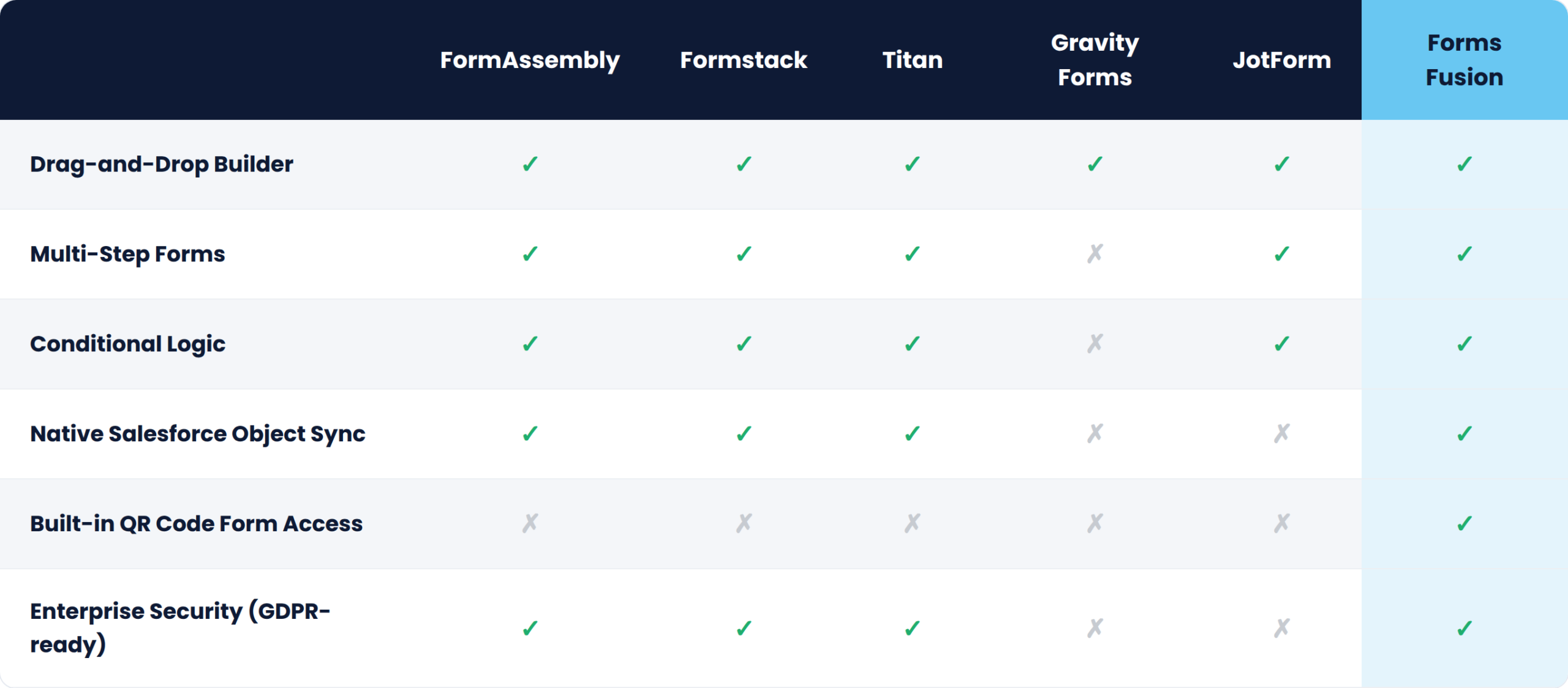
Launching in a crowded category is never easy but Forms Fusion was built around one idea: Salesforce form building shouldn’t require code, complexity, or a five-figure budget. Here’s why it’s gaining traction fast:
1. QR-Code-Native Forms No other major Salesforce form builder treats QR codes as a first-class feature. Every form you create in Forms Fusion gets an instant, scannable QR code perfect for events, print collateral, product packaging, in-store signage, or even business cards, all routing data directly into Salesforce.
2. Simple, No-Code Interface You don’t need to be a developer. If you can drag, drop, and click, you can build a Salesforce-connected form in minutes.
3. Native Salesforce Integration No clunky middleware or third-party connectors. Submissions flow straight into Leads, Contacts, Cases, or any custom object you choose.
4. Affordable for Growing Teams Unlike enterprise tools priced for Fortune 500 budgets, Forms Fusion is priced for startups, SMBs, and consultancies that need power without the premium.
5. Built for Online and Offline Capture Most form builders assume every lead starts on a website. Forms Fusion bridges physical and digital scan a QR code at a trade show booth, and the data lands in Salesforce in real time.
Lead Capture Forms: Embed forms on your website or print them as QR codes on flyers and banners to automatically create Salesforce Leads.
Event Registration: Place a Forms Fusion QR code on event signage so attendees scan, register, and sync straight into Salesforce Campaigns no clipboard, no manual entry.
Customer Feedback: Collect NPS surveys, product reviews, or satisfaction scores, with QR codes on receipts or packaging for instant post-purchase feedback.
Internal Data Requests: Build internal forms for HR, IT, or operations teams, accessible via shared links or printed QR codes around the office.
Partner & Vendor Onboarding: Streamline applications and store details directly in Salesforce, with a shareable QR code for partner kits and onboarding packets.
Choosing the right Salesforce form builder doesn’t have to be overwhelming. Established players like FormAssembly, Formstack, and Titan are powerful, but they’re often too complex, too expensive, or too web-only for everyday businesses that also need to capture data offline. That’s where Forms Fusion comes in combining no-code simplicity, native Salesforce sync, and a QR-code-first approach that no other major competitor offers.
If you’re ready to make Salesforce form building effortless both online and off give Forms Fusion a try today.
Everything you need to know about Salesforce Form Builders.
A Salesforce form builder is a tool that lets you create online (and increasingly offline) forms connected directly to Salesforce without writing code. It ensures accurate, real-time data entry into Salesforce while improving the experience for everyone filling out the form.
It depends on your business size and requirements. Established tools like FormAssembly, Formstack, and Titan offer advanced capabilities but can be expensive and complex. If you want simplicity, affordability, and a unique advantage for offline lead capture, Forms Fusion stands out with its native QR code functionality.
Forms Fusion combines a no-code drag-and-drop builder, native Salesforce object synchronization, multi-step forms, and conditional logic. It also offers a unique feature that many competitors don’t: built-in QR codes for every form, making offline and online data collection seamless.
Yes. Modern Salesforce form builders, including Forms Fusion, support multi-step forms, conditional logic, file uploads, and real-time Salesforce updates. This makes it easy to build complex workflows without custom development.
Forms Fusion is designed for both. Small businesses benefit from its affordability and quick setup, while enterprises appreciate its scalability and native Salesforce integration. Whether you’re collecting 50 leads at an event or managing thousands of submissions online, Forms Fusion grows with your business.
Forms Fusion uses QR codes that open mobile-friendly web forms. While the device scanning the QR code requires an internet connection to load and submit the form, no app download or user login is needed, making the experience fast and frictionless for attendees, customers, and partners.
Most businesses don’t struggle with managing data in Salesforce—they struggle with getting the right data into Salesforce efficiently.
Whether it’s lead generation, customer support, event registrations, or feedback collection, forms are often the primary way businesses capture information. Yet for many Salesforce users, creating and managing forms still involves custom coding, developer support, and ongoing maintenance.
That’s where a Salesforce Form Builder makes a difference.
With a modern no-code Salesforce Form Builder Tool, businesses can create powerful forms, automate data collection, and connect submissions directly to Salesforce without writing a single line of code. The result is faster deployment, improved data accuracy, and greater flexibility for teams across sales, marketing, and customer service.
In this guide, we’ll explore how Salesforce Form Builders work, their key benefits, essential features, and why businesses are increasingly choosing solutions like Forms Fusion to simplify form creation.
Every organization relies on data to make informed decisions. Sales teams need accurate lead information, marketing teams depend on campaign data, and customer service departments require complete customer records to provide exceptional support.
While Salesforce excels at managing data, capturing that data efficiently can be challenging.
Many businesses still rely on traditional form development methods that create several operational obstacles.
Building Salesforce forms often requires technical expertise. Every new form, field update, or workflow modification may require developer involvement, creating delays and increasing costs.
Custom-coded forms can take days or weeks to develop, test, and deploy. This slows down marketing campaigns, sales initiatives, and customer engagement efforts.
Once forms are built, they require ongoing maintenance. Changes to business processes, Salesforce objects, or workflows often result in additional development work.
Business needs evolve constantly. Traditional forms can be difficult to modify quickly, making it harder for teams to respond to changing requirements.
Without proper validation and automation, manually created forms often result in incomplete, inaccurate, or duplicate records entering Salesforce.
Today’s organizations use Salesforce forms for a wide variety of business processes:
Each of these use cases requires fast, reliable, and accurate data collection.
A No Code Form Builder removes technical barriers and puts form creation directly into the hands of business users.
Benefits include:
Instead of waiting for development resources, teams can create and deploy forms independently, accelerating business outcomes.
A Salesforce Form Builder is a software solution that enables users to create, customize, and deploy forms that connect directly with Salesforce.
Unlike traditional web forms, modern Salesforce Form Builder Apps go beyond simple data collection. They help automate processes, validate information, and ensure data is stored correctly within Salesforce.
The process is simple:
This eliminates manual data entry while improving data accuracy and operational efficiency.
Drag-and-Drop Form Creation: Users can design forms visually without coding, making form creation accessible to non-technical teams.
Salesforce Object Mapping: Fields can be connected directly to:
Dynamic Forms: Conditional logic allows forms to display relevant fields based on user responses, creating personalized experiences.
Validation Rules: Real-time validation helps prevent incorrect or incomplete data submissions.
Workflow Automation: Forms can trigger Salesforce Flows, email notifications, lead assignments, and other automated processes.
Organizations across industries are adopting no-code solutions because they offer significant business advantages.
One of the biggest advantages of a Salesforce Form Builder is speed.
Instead of spending weeks developing custom forms, teams can launch new forms in hours. This enables businesses to respond quickly to market opportunities, customer needs, and operational changes.
Marketing, sales, and customer service teams can create and manage forms independently.
This reduces reliance on technical resources and allows developers to focus on higher-value projects.
Data quality is critical for CRM success.
A Salesforce Form Builder Tool helps improve accuracy through:
Cleaner data leads to better reporting, forecasting, and decision-making.
Customers prefer simple and intuitive forms.
Dynamic forms reduce friction by showing only relevant questions, making submissions faster and easier.
This often leads to higher completion rates and improved engagement.
Traditional form development can become expensive due to development, testing, and maintenance costs.
A No Code Form Builder reduces these expenses while increasing flexibility.
Whether you’re managing dozens or thousands of submissions, a modern Salesforce Form Builder App can scale with your business needs.
Organizations can support multiple departments, regions, and business processes using a single platform.
Automation eliminates manual tasks such as:
This allows teams to focus on strategic initiatives rather than repetitive administrative work.
Creating Salesforce forms shouldn’t require coding expertise, lengthy development cycles, or constant maintenance.
With Forms Fusion, businesses can build intelligent Salesforce-connected forms in minutes using an intuitive no-code interface.
Whether you’re capturing leads, managing support requests, collecting feedback, or automating registrations, Forms Fusion provides everything you need to simplify form creation and maximize Salesforce productivity.
Install Forms Fusion today and start building smarter, faster, and effortless Salesforce forms.
Experience Forms Made Easy in Action – Book Your Demo Now
A Salesforce Form Builder is a tool that allows users to create, customize, and manage forms that connect directly with Salesforce. It helps businesses capture data, automate workflows, and create Salesforce records without requiring custom coding.
A No Code Salesforce Form Builder enables business users to create and deploy forms without developer assistance. This reduces implementation time, lowers costs, improves flexibility, and accelerates data collection processes.
Yes. Most advanced Salesforce Form Builder tools, including Forms Fusion, support both standard and custom Salesforce objects, allowing businesses to capture and manage data according to their unique requirements.
Forms Fusion allows you to create various Salesforce-connected forms, including lead generation forms, customer support forms, event registration forms, surveys, feedback forms, partner onboarding forms, and more.
A Salesforce Form Builder improves data accuracy through features like field validation, required fields, duplicate record prevention, conditional logic, and automated Salesforce mapping. This ensures cleaner and more reliable CRM data.
Absolutely. Forms Fusion is designed to scale with business needs, making it suitable for startups, growing companies, and large enterprises that need a flexible and powerful Salesforce Form Builder app for efficient data collection and automation.
Modern businesses don’t just need online forms anymore they need faster data collection, instant mobile access, and seamless Salesforce automation. Traditional form systems often create delays, require technical support, and slow down customer interactions. Forms Fusion changes this experience with a powerful QR Based Salesforce Form Builder that helps businesses create smart, mobile-friendly forms directly connected to Salesforce without complex coding or lengthy setup.
As organizations continue moving toward automation-first operations in 2026, businesses are looking for tools that save time, improve productivity, and create better customer experiences. This is exactly why QR-powered forms are becoming increasingly popular across industries.
Forms Fusion combines the simplicity of no-code form creation with the power of Salesforce integration and the convenience of QR technology. The result is a smarter way to collect, manage, and automate business data.
Forms Fusion is a modern no-code Salesforce Form Builder designed to help businesses create forms quickly and manage data more efficiently inside Salesforce. Instead of relying on developers or complex coding processes, teams can build professional forms using a simple drag-and-drop interface.
The platform allows businesses to:
Forms Fusion is built for organizations that want a faster and more scalable way to manage forms directly within their Salesforce ecosystem.
Traditional online forms usually depend on long URLs, manual sharing methods, or multiple steps before users can access the form. This often creates friction and reduces response rates.
A QR Based Salesforce Form Builder solves this problem by allowing users to instantly open forms through a simple QR code scan.
With Forms Fusion, businesses can place QR codes almost anywhere:
Users simply scan the QR code using their smartphone camera and access the form immediately through their browser.
No app installation. No complicated login process. No wasted time.
This creates a smoother experience for customers while helping businesses collect faster and more accurate responses.
Customer behavior has changed significantly over the last few years. People now expect instant digital interactions and mobile-friendly experiences. Businesses that still depend on outdated form systems often struggle with low engagement and slower operations.
QR-powered forms help solve these challenges by making form access incredibly simple.
Here are some major reasons businesses are adopting QR Based Salesforce Forms:
Users can access forms within seconds simply by scanning a QR code.
QR forms are naturally mobile-friendly because users access them directly from their smartphones.
Removing unnecessary steps increases the chances of users completing forms.
QR technology supports modern contactless workflows for registrations, surveys, feedback, and service requests.
Submitted responses sync directly into Salesforce for faster processing and automation.
One of the biggest advantages of Forms Fusion is its no-code approach.
Traditional Salesforce form setups often require technical teams for:
This slows down operations and increases dependency on developers.
Forms Fusion removes these barriers with an intuitive drag-and-drop interface that allows anyone to create forms quickly.
Marketing teams can launch lead generation forms. HR departments can create onboarding forms. Customer support teams can manage service requests. Event managers can handle registrations.
All without coding.
This flexibility helps businesses move faster while reducing operational bottlenecks.
A form builder becomes truly valuable when it works seamlessly with Salesforce.
Forms Fusion is designed specifically for Salesforce environments, making data synchronization smooth and efficient.
When users submit forms:
This reduces manual work and improves data accuracy across departments.
Instead of spending hours transferring information manually, businesses can focus on sales, customer service, and growth.
Today, most users interact with businesses through mobile devices. A form that does not work properly on smartphones can lead to poor engagement and abandoned submissions.
Forms Fusion is built with a mobile-first design approach to ensure forms perform smoothly across all screen sizes.
Combined with QR accessibility, this creates a highly convenient user experience.
Whether someone is filling out:
The process stays fast, simple, and user-friendly.
Forms Fusion is flexible enough to support multiple business functions across industries.
Businesses can capture leads directly into Salesforce using QR codes placed at exhibitions, trade shows, or retail stores.
Restaurants, retail stores, and service providers can collect instant customer feedback using QR-based surveys.
Event organizers can simplify attendee registration with mobile-friendly QR forms.
HR teams can automate onboarding documents and workflows directly within Salesforce.
Businesses can streamline customer service requests with connected Salesforce workflows.
Organizations can reduce paperwork and improve efficiency with digital QR-powered forms.
Many businesses lose valuable time managing outdated manual processes.
Forms Fusion helps organizations improve productivity by:
Because forms can be created quickly without technical dependency, teams can launch campaigns and processes much faster.
This agility is especially important for growing businesses that need scalable solutions.
The demand for smarter Salesforce automation tools continues to grow. Businesses no longer want complicated systems that require long implementation cycles.
They want tools that are:
Forms Fusion delivers all these capabilities in one platform.
Its combination of QR technology, no-code form building, and Salesforce integration makes it a future-ready solution for businesses looking to modernize their operations.
Forms Fusion is more than just another online form tool. It is a modern QR Based Salesforce Form Builder built for businesses that want faster workflows, better customer experiences, and smarter Salesforce automation.
With QR-powered access, drag-and-drop form creation, mobile responsiveness, and real-time Salesforce integration, Forms Fusion helps organizations simplify data collection while improving operational efficiency.
As businesses continue embracing automation and mobile-first experiences in 2026, QR-powered Salesforce forms are becoming an essential part of modern business operations.
For companies looking to streamline workflows, improve engagement, and collect data more efficiently, Forms Fusion offers a smarter and more scalable solution.